

Microsoft Surface vs MacBook: Which One Should You Buy in 2026?
Category: Tech
Author: ExactSolution Team
Microsoft Surface vs MacBook compared with real specs, tested battery life, display benchmarks, and pricing at every tier. Find out which laptop fits your daily use in 2026.
The MacBook Air M5 is the faster, lighter and cheaper choice for most people. The Surface Laptop (8th Edition) lasts longer in lab tests, with 18.9 hours against 16.2 hours, and adds a touchscreen and a 120Hz display. Buy Surface if you need Windows or touch, and buy a MacBook if you want the most speed per dollar.
Both Apple and Microsoft replaced their lineups in 2026. Apple now sells the MacBook Air and MacBook Pro with M5 chips, and Microsoft sells the Surface Laptop and Surface Pro with Snapdragon X2 chips. This guide compares the current models using independent test results, not marketing claims.
Microsoft Surface vs MacBook: Quick Specs
Feature | MacBook Air 13 (M5) | MacBook Pro 14 (M5) | Surface Laptop 13.8 (8th Edition) |
|---|---|---|---|
Chip | Apple M5, 10-core CPU | Apple M5, 10-core CPU | Snapdragon X2 Plus (10-core) or X2 Elite (12-core) |
Memory | 16GB, up to 32GB | 16GB | 16GB or more |
Base storage | 512GB | 512GB | 512GB, swappable M.2 SSD |
Display | 13.6", 2560x1664, 60Hz | 14.2", 3024x1964, 120Hz | 13.8", 2304x1536, 120Hz, touch |
Brightness | 500 nits (Apple) | 1,000 nits sustained | 623 nits measured |
Battery rating | Up to 18 hours | Up to 24 hours | Up to 20 hours |
Weight | 1.2 kg (2.71 lb) | 1.55 kg (3.4 lb) | 1.34 kg (2.95 lb) |
Ports | 2x Thunderbolt 4, MagSafe | 3x Thunderbolt 4, HDMI, SD card | 2x USB4, 1x USB-A, Surface Connect |
Touchscreen | No | No | Yes |
Starting price (US) | $1,099 | $1,599 | $1,599 |
Specs come from Apple’s MacBook Air announcement and Notebookcheck’s review of the Surface Laptop. Battery ratings come from each maker, so treat them as best-case figures.
Which Is Faster: Surface or MacBook?
The MacBook Air M5 is faster in almost every test. In Notebookcheck’s testing, it scored 49% higher in single-core Cinebench 2024 than the Surface Laptop 8. It also led by 20% in Geekbench 6 multi-core and by 45% in the CrossMark productivity suite.
Test | MacBook Air M5 | Surface Laptop 8 | Surface Pro 13 OLED | Surface Laptop 7 |
|---|---|---|---|---|
Cinebench 2024 multi-core | 957 | 854 | 1,078 | 897 |
Cinebench 2024 single-core | 200 | 134 | 133 | 123 |
Geekbench 6 multi-core | 17,072 | 14,277 | 15,102 | 14,234 |
Geekbench 6 single-core | 4,185 | 3,265 | 3,287 | 2,805 |
CrossMark overall | 2,314 | 1,594 | not tested | 1,402 |
Surface is not slow. The new Snapdragon X2 chips are clearly faster than last year’s, and everyday work feels quick on both platforms. The gap shows up in single-threaded tasks and creative apps, where the MacBook Air leads CrossMark’s creativity score by 52%.
One caveat applies to Windows on ARM. App compatibility has improved a lot since 2024, but some Windows software still needs emulation or has no native version. Check your key apps before you buy a Surface.
Which Has Better Battery Life?
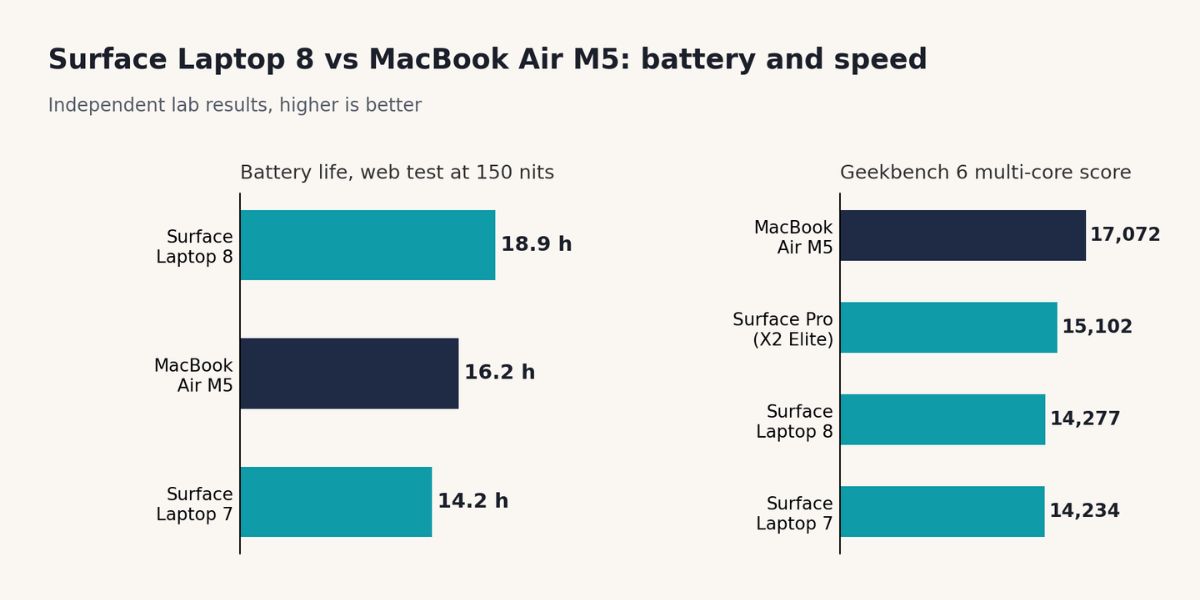
The Surface Laptop 8 won the battery test. Notebookcheck measured 18.9 hours of Wi-Fi web browsing at 150 nits, against 16.2 hours for the MacBook Air M5. At full brightness, the Surface lasted 8.7 hours and the MacBook Air 6.7 hours.
Laptop | Maker rating | Web test (150 nits) | Web test (max brightness) |
|---|---|---|---|
Surface Laptop 8 13.8" | Up to 20 hours | 18.9 hours | 8.7 hours |
MacBook Air 13 M5 | Up to 18 hours | 16.2 hours | 6.7 hours |
Surface Laptop 7 13.8" | n/a | 14.2 hours | 7.8 hours |
Microsoft rates the 13.8-inch Laptop at up to 20 hours and the 15-inch at 19 hours, according to PCWorld. Apple rates the MacBook Pro at up to 24 hours, the longest rating of any model here. Real results depend on brightness, apps and Wi-Fi, so expect less than the ratings.
MacBook Air vs Surface Pro
The Surface Pro is a tablet with a detachable keyboard, so it suits a different buyer. It adds touch, pen input and a lighter tablet body. The MacBook Air gives you a better keyboard, a lap-friendly design and faster single-core speed.
In Notebookcheck’s data, a Surface Pro 13 OLED with the Snapdragon X2 Elite beat the MacBook Air M5 in Cinebench multi-core, 1,078 to 957. The MacBook Air won Geekbench multi-core by 13% and single-core by 27%. In the 3DMark Steel Nomad graphics test, the MacBook Air scored 941 against 711.
Microsoft rates the new Surface Pro at about 15.5 hours of local video, below the MacBook Air’s 18. Choose the Surface Pro for sketching, note-taking and tablet use. Choose the MacBook Air for typing, travel and all-day laptop work.
Surface Laptop vs MacBook Air: Display, Design and Ports
The Surface Laptop has the smoother and brighter screen. Notebookcheck measured an average of 623 nits and a 120Hz refresh rate, plus a touchscreen. The MacBook Air runs at 60Hz and averaged about 520 nits, but its 2560x1664 panel is slightly sharper at 225 pixels per inch against 201.
The MacBook Air is thinner and lighter, at 11.3 mm and 1.2 kg. The Surface Laptop is 17.5 mm thick and weighs 1.34 kg. The MacBook Air has no fan, while the Surface Laptop’s fan reached 42.4 dB under full load in testing.
Ports favor Surface for everyday use. It includes a USB-A port, two USB4 ports and a headphone jack. The MacBook Air has two Thunderbolt 4 ports and MagSafe, and only the MacBook Pro adds HDMI and an SD card slot.
Software and Ecosystem: macOS vs Windows 11
Choose macOS if you own an iPhone or iPad, develop for Apple platforms, or want a tightly integrated system. Choose Windows 11 if your workplace relies on Windows-only software, business tools or touch input. Software support often decides the purchase more than hardware does.
Notebookcheck notes that Microsoft sells private buyers only the Snapdragon version of the Surface Laptop. Intel versions exist for business customers. That limits private buyers who need full x86 compatibility.
Repairability and Upgrades
The Surface Laptop has a swappable M.2 2230 SSD, which makes storage upgrades possible. Its RAM is soldered, and Notebookcheck scored its repairability at 40%. MacBook memory sits inside the chip package, so you cannot upgrade it later. Pick your RAM size carefully on either brand.
Price: Surface vs MacBook
At the same 16GB and 512GB spec, the Surface Laptop costs about 45% more than the MacBook Air. The MacBook Air starts at $1,099, and Notebookcheck lists the Surface Laptop 13.8 at $1,599. Apple raised the Air’s starting price by $100 this year, but it doubled the base storage to 512GB.
Model | Base configuration | US starting price |
|---|---|---|
MacBook Neo | Budget MacBook, announced March 2026 | $599 |
MacBook Air 13 (M5) | 16GB / 512GB | $1,099 |
MacBook Pro 14 (M5) | 16GB / 512GB | $1,599 |
Surface Laptop 13.8 (8th Edition) | 16GB / 512GB | $1,599 |
Prices change often, and retailers regularly discount both brands. Check the live price before you decide
Is a Refurbished MacBook or Surface a Better Deal?
Refurbished models cost less than new ones and still handle everyday work well. Last year’s chips are fast enough for most office, study and browsing tasks. Compare the condition grade, battery health, warranty and return terms across sellers.
You can browse graded refurbished MacBooks or refurbished Microsoft Surface laptops at Exact Solution. Each listing shows its condition grade and specifications. Compare the exact configuration with the current new price before you order.
Who Should Buy a MacBook, and Who Should Buy a Surface?
Buy a MacBook if you:
Want the best speed for the money, especially in creative apps
Edit video or photos, or compile code
Already use an iPhone or iPad
Want a silent, fanless laptop (MacBook Air)
Buy a Surface if you:
Need Windows software or work in a Windows-first company
Want a touchscreen, pen input or a 120Hz display at this size
Prefer a USB-A port and a swappable SSD
Want the longest battery life in lab tests (Surface Laptop 8)
Conclusion
The MacBook Air M5 is the best all-round pick, with higher speed, a lighter body and a $500 lower price. The Surface Laptop 8 is the better choice for Windows users who want touch, a 120Hz screen and the longest tested battery life. Decide on your operating system first, then compare speed, battery and price.